How to Reduce No-Shows with Appointment Reminder Text Messages in 2026
Missed appointments are more than just an inconvenience. They lead to lost revenue, wasted staff time, scheduling gaps, and frustrated customers. Whether you run a healthcare clinic, dental practice, beauty salon, automotive repair shop, fitness centre, or consulting business, reducing no-shows should be a top priority.
One of the simplest and most effective ways to solve this problem is by using Appointment Reminder Text Messages. Since most people carry their phones throughout the day and read text messages within minutes, SMS reminders help customers remember their appointments and make it easier for them to confirm, reschedule, or cancel if needed.
In 2026, businesses are moving away from relying only on phone calls and emails. Automated SMS reminders provide faster communication, improve customer experience, and significantly reduce missed appointments.
This guide explains how Appointment Reminder Text Messages work, why they are effective, and how your business can use them to improve attendance while saving valuable time.
Why Do Customers Miss Appointments?
Most customers do not intentionally skip appointments. In many cases, they simply forget.
Common reasons include:
- Busy work schedules
- Family commitments
- Calendar conflicts
- Forgotten bookings
- Email reminders being ignored
- Missed phone calls
Traditional reminder methods are becoming less effective because people receive hundreds of emails every week. Many promotional emails never reach the inbox, while phone calls are often ignored.
Text messages are different.
SMS has one of the highest open rates of any communication channel, making Appointment Reminder Text Messages one of the most dependable ways to reach customers before their scheduled visit.
Why SMS Appointment Reminders Work Better Than Email
Businesses often ask whether they should send reminder emails or text messages.
The answer is simple: both can be useful, but SMS usually receives attention much faster.
Here is why SMS Appointment Reminders are so effective:
- Messages arrive instantly
- Most texts are opened within minutes
- Customers do not need internet access to receive SMS
- Short messages are easier to read
- Customers can quickly reply to confirm or reschedule
Instead of waiting for customers to notice an email, businesses can place the reminder directly into their mobile inbox where it is far more likely to be seen.
For time-sensitive appointments, SMS Appointment Reminders consistently outperform traditional communication methods.
Industries That Benefit from Appointment Reminder Text Messages
Almost any appointment-based business can benefit from SMS reminders.
Healthcare Clinics
Healthcare providers regularly use Appointment Reminder SMS to reduce missed consultations.
Common examples include:
- Doctor appointments
- Dental visits
- Physiotherapy sessions
- Eye examinations
- Vaccination reminders
Patients appreciate receiving a simple reminder before their visit, especially when appointments are booked weeks in advance.
Beauty and Wellness Businesses
Salons, spas, and wellness centres lose income every time a customer forgets an appointment.
Automated reminders help clients remember:
- Hair appointments
- Spa treatments
- Nail services
- Massage bookings
- Skincare consultations
A quick reminder often prevents empty time slots that cannot be filled at the last minute.
Automotive Service Centres
Repair shops and dealerships frequently schedule appointments several days ahead.
Using Appointment Reminder Software, businesses can automatically remind customers about:
- Vehicle servicing
- Oil changes
- Inspections
- Tyre replacements
This reduces missed bookings and improves workshop efficiency
Fitness and Coaching Businesses
Personal trainers, coaches, tutors, and consultants also rely on appointments.
Sending Text Message Appointment Reminders before each session helps improve attendance while reducing last-minute cancellations.
Benefits of Appointment Reminder Text Messages
1. Reduce No-Shows
The biggest advantage is obvious.
Customers who receive reminders are much more likely to attend their appointments.
Many businesses report significant reductions in missed appointments after introducing SMS reminders.
2. Save Staff Time
Without automation, staff members spend hours making reminder phone calls.
Modern Appointment Reminder Software automatically sends reminders based on your schedule.
Staff can focus on serving customers instead of calling dozens of people every day.
3. Improve Customer Experience
Customers appreciate helpful reminders.
Instead of feeling interrupted by phone calls, they receive a short message that can be read whenever convenient.
This creates a better customer experience and strengthens trust.
4. Increase Revenue
Every missed appointment represents lost income.
Reducing no-shows means:
- More completed appointments
- Better staff productivity
- Higher daily revenue
- Improved scheduling efficiency
Businesses investing in Automated Appointment Reminders often see a strong return because even a small reduction in missed appointments can make a noticeable financial difference.
What Makes an Effective Appointment Reminder?
Not every reminder message performs equally well.
Successful Appointment Reminder Text Messages are:
- Short
- Clear
- Friendly
- Easy to understand
- Action-oriented
For example:
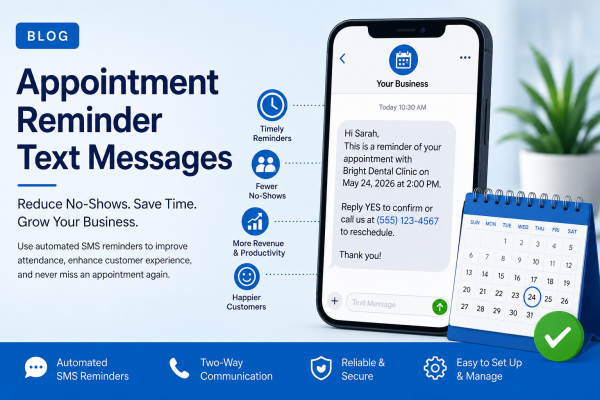
Hi Sarah, this is a reminder that you have an appointment with Bright Dental Clinic on Tuesday at 2:00 PM. Reply YES to confirm or call us if you need to reschedule.
This type of message gives customers all the information they need without unnecessary detail.
Best Time to Send Appointment Reminder SMS
Timing matters.
Many businesses send multiple reminders depending on the type of appointment.
A common schedule includes:
- Immediately after booking
- 48 hours before the appointment
- 24 hours before the appointment
- One final reminder a few hours before arrival if appropriate
Using an automated SMS Reminder Service, these reminders can be scheduled in advance, ensuring every customer receives timely notifications without manual effort.
Best Practices for Writing Appointment Reminder Text Messages
A reminder message should do more than simply notify a customer. It should encourage them to take action while remaining friendly and professional.
Follow these best practices when creating Appointment Reminder Text Messages.
Keep Messages Short
Text messages have limited space, so avoid long explanations. Include only the essential details:
- Business name
- Appointment date
- Appointment time
- Location (if necessary)
- Confirmation or rescheduling instructions
A concise message is easier to read and more likely to receive a response.
Personalize Every Message
Adding the customer’s name makes your reminders feel more personal.
For example:
Hi Michael, this is a reminder of your appointment with ABC Dental Clinic on Thursday at 3:30 PM. Reply YES to confirm or call us if you need to reschedule.
Personalised Text Message Appointment Reminders help customers feel valued and increase engagement.
Include a Clear Call to Action
Every reminder should tell customers exactly what to do next.
Examples include:
- Reply YES to confirm
- Reply NO to cancel
- Click the link to reschedule
- Call our office if you need assistance
Simple instructions reduce confusion and help businesses manage appointments more efficiently.
Automate Your SMS Reminder Service
Sending reminders manually may work for a handful of appointments, but it quickly becomes difficult as your business grows.
An automated SMS Reminder Service can:
- Schedule reminders automatically
- Send confirmation requests
- Deliver follow-up reminders
- Track message delivery
- Handle thousands of appointments at once
Automation reduces administrative work while ensuring no customer is forgotten.
Common Mistakes That Increase No-Shows
Even businesses using SMS reminders can make mistakes that reduce their effectiveness.
Sending Reminders Too Late
A reminder sent only 30 minutes before an appointment gives customers little time to adjust their plans.
Instead, send reminders:
- Immediately after booking
- Two days before
- One day before
- A few hours before, when appropriate
Sending Too Many Messages
Customers appreciate reminders, but excessive messaging can become frustrating.
Stick to two or three reminders unless there is an important update.
Using Generic Messages
Messages that simply say “Reminder: Appointment Tomorrow” lack useful information.
Always include:
- Customer name
- Appointment date
- Time
- Business name
- Contact details if changes are needed
Ignoring Two-Way Communication
A modern Appointment Reminder System should allow customers to reply.
If someone needs to reschedule, giving them an easy way to respond helps avoid complete no-shows while keeping your schedule full.
Real-World Example
Imagine a busy dental practice with six dentists seeing more than 150 patients every day.
Before introducing Appointment Reminder Text Messages, the clinic experienced nearly 18% missed appointments every month. Reception staff spent several hours each day making reminder calls, yet many patients still forgot their bookings.
The clinic switched to an automated reminder process using scheduled SMS notifications.
The new workflow looked like this:
- Confirmation message immediately after booking
- Reminder 48 hours before the visit
- Final reminder 24 hours before the appointment
- Customers could reply to confirm or request a new time
After four months, the results were impressive:
- Missed appointments dropped by 38%
- Staff spent less time making manual calls
- Appointment confirmations increased significantly
- Empty time slots were quickly filled from the waiting list
- Patient satisfaction improved because communication became more convenient
This example shows how a simple SMS strategy can deliver measurable business benefits.
Why Businesses Choose ExpertTexting
Managing appointment reminders should be simple, reliable, and scalable.
ExpertTexting provides businesses with the tools needed to automate customer communication without adding extra work for staff.
With ExpertTexting, businesses can:
- Schedule Appointment Reminder Text Messages in advance
- Send bulk reminders within seconds
- Personalise messages with customer information
- Create automated reminder campaigns
- Monitor delivery reports
- Manage contacts from a single dashboard
- Support customer replies with two-way messaging
Whether you operate a healthcare practice, salon, automotive workshop, educational institution, or consulting business, ExpertTexting helps ensure customers receive timely reminders before every appointment.
Tips to Improve Appointment Attendance Even Further
While SMS reminders are highly effective, combining them with a few additional strategies can further improve attendance.
Consider these practical tips:
- Allow customers to confirm appointments with a single reply.
- Include calendar links in confirmation emails after the booking.
- Send reminder messages during normal business hours.
- Make it easy to reschedule instead of cancelling completely.
- Keep customer contact information updated.
- Track reminder performance and adjust timing based on response rates.
Small improvements can make a noticeable difference over time.
The Future of Appointment Reminder SMS
Businesses continue to look for faster and more convenient ways to communicate with customers.
Future Appointment Reminder SMS solutions are expected to include:
- AI-assisted scheduling
- Smarter reminder timing based on customer behaviour
- Rich media links for maps and directions
- CRM integrations
- Automated follow-up surveys after appointments
Despite these innovations, one thing remains constant: customers prefer quick, direct communication on their mobile phones.
SMS continues to be one of the most dependable communication channels available.
Conclusion
Reducing no-shows is not just about protecting revenue. It also improves customer satisfaction, staff productivity, and the overall efficiency of your business.
By using Appointment Reminder Text Messages, businesses can communicate with customers at the right time, reduce missed appointments, and simplify daily scheduling.
Whether you manage a medical practice, salon, repair centre, educational institution, or professional service business, automated SMS reminders provide a practical solution that delivers consistent results.
With ExpertTexting, you can automate reminders, improve customer communication, and spend less time chasing confirmations while keeping your appointment calendar full.
Frequently Asked Questions
1. What are Appointment Reminder Text Messages?
Appointment Reminder Text Messages are automated SMS notifications sent before scheduled appointments to remind customers and reduce missed bookings.
2. How effective are SMS Appointment Reminders?
SMS reminders have very high open rates and often help businesses significantly reduce no-shows compared to email or phone reminders.
3. Which businesses benefit from Appointment Reminder Software?
Healthcare providers, dentists, salons, automotive service centres, fitness studios, consultants, tutors, and many other appointment-based businesses benefit from automated reminder systems.
4. When should appointment reminders be sent?
Most businesses send reminders immediately after booking, 48 hours before the appointment, and again 24 hours before the scheduled time.
5. Can customers respond to Appointment Reminder SMS messages?
Yes. Many modern SMS platforms allow customers to confirm, cancel, or request a new appointment by replying directly to the message.
6. Why should businesses use ExpertTexting for appointment reminders?
ExpertTexting offers automated scheduling, personalised messaging, delivery tracking, bulk SMS capabilities, and two-way communication, making it easier to reduce no-shows and improve customer engagement.
About the Author

Sign up for free