How to Display Images Using Hyperlinks in SMS Messages
Images naturally attract attention. Whether you’re promoting a product, sharing an event invitation, or sending a special offer, visuals often communicate more effectively than text alone. However, standard SMS technology does not support embedded images like email or messaging apps.
So, how can businesses include pictures in their SMS campaigns?
The answer is simple: display images using hyperlinks in SMS messages.
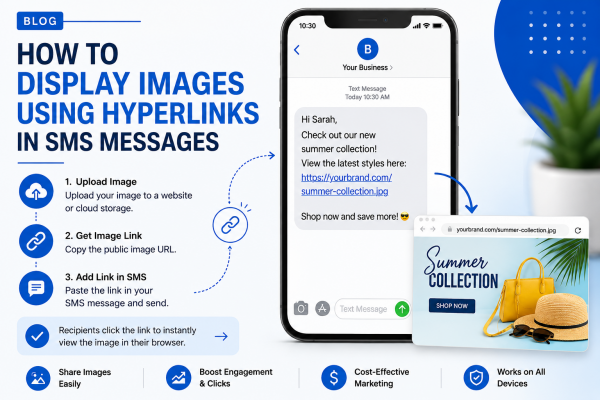
Instead of attaching an image directly, businesses upload the image to a website, landing page, or cloud storage and include a clickable link in the text message. When recipients tap the link, the image opens instantly in their mobile browser.
This approach allows businesses to keep SMS messages lightweight while still delivering rich visual experiences that encourage customer engagement.
Why Standard SMS Cannot Display Images
SMS was originally designed for plain text communication. It supports short text messages but does not allow images, videos, or other rich media files.
To send pictures directly, businesses typically use MMS (Multimedia Messaging Service). While MMS supports images, it also comes with limitations:
- Higher messaging costs
- Limited carrier support in some regions
- Larger file sizes
- Slower delivery
- Inconsistent international availability
For businesses sending thousands of messages, using hyperlinks is often a more practical and cost-effective solution.
Instead of relying on MMS, marketers can simply upload an image online and include a clickable URL inside the SMS.
Why Use Hyperlinks Instead of MMS?
Many businesses now choose hyperlinks because they provide greater flexibility and better campaign tracking.
Benefits include:
- Lower messaging costs
- Faster SMS delivery
- Works on most mobile devices
- Supports high-quality images
- Easy to update image content without changing the SMS
- Allows click tracking and campaign analytics
When recipients click the link, they can view product images, promotional banners, menus, brochures, event posters, or any other visual content.
This method is especially useful for businesses running regular SMS Marketing Campaigns.
How Hyperlinks Work in SMS Messages
The process is straightforward.
Step 1: Upload Your Image
Store the image on:
- Your website
- A landing page
- Cloud storage
- An image hosting service
The image should have a publicly accessible URL.
Step 2: Copy the Image Link
Once uploaded, copy the direct web address.
Example:
Many businesses shorten long URLs using branded or secure link shorteners to keep messages clean and professional.
Step 3: Insert the Link into Your SMS
Example:
Summer Sale starts today! View our latest offers here: https://yourwebsite.com/sale
When customers tap the hyperlink, the image opens instantly in their mobile browser.
This simple technique allows businesses to display images using hyperlinks in SMS messages without relying on MMS.
Benefits of Displaying Images Through Hyperlinks
Better Customer Engagement
Images naturally capture attention.
Whether promoting a new product or announcing an event, visuals encourage more interaction than plain text alone.
Businesses using SMS Campaigns often notice higher click-through rates when image links are included.
Lower Campaign Costs
MMS generally costs more than traditional SMS.
Using hyperlinks lets businesses send standard SMS messages while still delivering rich visual content.
For companies sending thousands of messages every month, this can result in significant cost savings.
Faster Delivery
Text-only SMS messages are delivered quickly across nearly all mobile networks.
Because the image loads only after the customer clicks the link, message delivery remains fast and reliable.
Track Customer Behaviour
Unlike standard MMS, hyperlinks provide valuable marketing insights.
Businesses can monitor:
- Total clicks
- Click-through rate
- Popular campaigns
- Customer engagement
- Conversion performance
This data helps improve future SMS Marketing campaigns and supports better decision-making.
Best Use Cases for Image Hyperlinks in SMS
Ecommerce Promotions
Online stores frequently send product announcements.
Instead of describing a product in text, they can include a hyperlink that opens directly to:
- Product images
- Collection pages
- Discount banners
- Flash sales
Customers immediately see what is being promoted.
Restaurant Promotions
Restaurants often use SMS to advertise:
- Daily specials
- Seasonal menus
- Family meal deals
- Holiday promotions
A photo of a featured meal is much more appealing than text alone.
Event Invitations
Businesses organising conferences, webinars, concerts, or community events can share:
- Event posters
- Speaker line-ups
- Venue maps
- Registration banners
A simple hyperlink makes the invitation more engaging.
Real Estate Listings
Property agencies can include links to:
- Property photos
- Virtual tours
- Floor plans
- Listing pages
This gives potential buyers immediate access to visual information without sending large multimedia files.
Healthcare and Clinics
Medical providers can share links to:
- Appointment preparation guides
- Clinic maps
- Health awareness posters
- Vaccination information
Patients receive useful visual content while still benefiting from fast SMS delivery.
Best Practices for Using Image Hyperlinks in SMS
Keep Messages Short
SMS works best when messages are concise.
Include only:
- A clear purpose
- A short description
- A clickable hyperlink
- A simple call to action
Example:
New arrivals are here! View the collection today: https://yourwebsite.com/new
Use Secure Links
Always use HTTPS links.
Customers are more likely to trust secure websites, and many mobile browsers flag insecure links as potentially unsafe.
Optimise Images for Mobile
Most customers open SMS on smartphones.
Ensure your images:
- Load quickly
- Display correctly on smaller screens
- Have readable text
- Maintain good quality without large file sizes
Large image files may cause slow loading, which can reduce engagement.
Include a Strong Call to Action
Tell customers why they should click.
Examples include:
- View today’s offer
- See our latest products
- Download the brochure
- Claim your discount
- Explore our new collection
Clear calls to action encourage more clicks and improve campaign performance.
Should You Use URL Shorteners?
Long URLs can make SMS messages look cluttered and reduce trust. A shortened, branded link creates a cleaner appearance and makes your message easier to read.
A good URL shortener can also provide useful analytics, including:
- Total clicks
- Unique visitors
- Device types
- Geographic locations
- Click times
These insights help businesses understand customer behaviour and improve future SMS Campaigns.
Whenever possible, use branded short links instead of generic URLs. A branded domain looks more professional and reassures recipients that the link is safe.
Tracking Performance with SMS Hyperlinks
One of the biggest advantages of using hyperlinks is the ability to measure campaign performance.
Unlike traditional SMS, hyperlinks provide valuable marketing data that helps optimise future campaigns.
Useful metrics include:
- Click-through rate (CTR)
- Number of image views
- Landing page visits
- Conversion rate
- Bounce rate
- Sales generated
If your image links lead to product pages or landing pages, you can also integrate tracking tools such as Google Analytics or UTM parameters to measure customer journeys more accurately.
This makes SMS Marketing far more measurable than sending plain text messages alone.
Common Mistakes to Avoid
Even though using hyperlinks is simple, there are several mistakes businesses should avoid.
Using Broken Links
Always test your hyperlink before launching a campaign.
A broken link creates a poor customer experience and may reduce confidence in your brand.
Sending Low-Quality Images
Blurry or poorly designed visuals can reduce engagement.
Use:
- High-resolution images
- Professional product photography
- Clear promotional banners
- Mobile-friendly graphics
Quality visuals encourage customers to click and take action.
Forgetting Mobile Optimisation
Since most recipients open SMS on smartphones, linked pages should load quickly and display correctly on mobile devices.
Avoid pages that require excessive zooming or slow-loading images.
Using Too Many Links
One clear hyperlink is usually enough.
Including multiple links in a single SMS can confuse recipients and reduce click rates.
Keep your message focused on one action.
Ignoring Compliance
Before sending promotional SMS messages, always ensure recipients have provided proper consent.
Following SMS marketing regulations helps protect your business while building trust with customers.
Industries That Benefit from Image Hyperlinks
Many industries successfully use image links in their SMS communication.
Ecommerce
Retail businesses share:
- New arrivals
- Seasonal collections
- Product launches
- Flash sale banners
- Limited-time discounts
Adding an image link allows customers to view products immediately after receiving the message.
Real Estate
Property agents use hyperlinks to display:
- Property galleries
- Virtual tours
- Floor plans
- Open house promotions
This provides buyers with more information without overwhelming the SMS itself.
Restaurants
Restaurants often include image links for:
- New menu items
- Family meal deals
- Weekend specials
- Holiday promotions
Food photography naturally attracts attention and encourages more orders.
Schools and Educational Institutions
Schools can use Text Messaging for Schools to share links to:
- Event posters
- School newsletters
- Timetables
- Registration forms
- Photo galleries
This keeps parents informed without sending bulky attachments.
Healthcare Providers
Clinics can include links to:
- Appointment preparation guides
- Health awareness campaigns
- Vaccination information
- Clinic directions
This approach provides patients with additional information while keeping reminder messages short.
Why Businesses Choose Hyperlinks Instead of MMS
While MMS has its place, hyperlinks offer greater flexibility for most marketing campaigns.
Businesses prefer hyperlink-based messaging because it:
- Costs less than MMS
- Supports unlimited image quality
- Allows click tracking
- Works across more mobile devices
- Makes campaigns easier to update
- Improves reporting and analytics
For businesses sending thousands of promotional messages every month, hyperlinks often deliver a better return on investment.
How ExpertTexting Helps You Share Images Through SMS
ExpertTexting makes it easy to include hyperlinks in your SMS campaigns, helping businesses combine the speed of SMS with engaging visual content.
Using ExpertTexting, you can:
- Send bulk SMS with clickable hyperlinks
- Personalise messages for different customer groups
- Schedule campaigns in advance
- Track link performance
- Manage contacts from one dashboard
- Create targeted Mass Texting Service campaigns
Whether you’re promoting products, sharing event details, or directing customers to a landing page, ExpertTexting provides the tools needed to build effective SMS campaigns.
Best Practices for Better Results
To maximise engagement, follow these recommendations:
- Keep messages under 160 characters where possible.
- Place the hyperlink near the end of the message.
- Clearly explain what customers will see after clicking.
- Use branded short links when available.
- Test every hyperlink before sending.
- Optimise landing pages for mobile users.
- Include one clear call to action.
- Monitor click performance and improve future campaigns based on results.
Small improvements can significantly increase customer engagement.
Conclusion
Although standard SMS cannot display images directly, businesses can still create visually engaging campaigns by using hyperlinks.
By uploading an image to a secure webpage and including a clickable link in the message, companies can share product photos, promotional banners, event invitations, menus, brochures, and other visual content without relying on MMS.
This method reduces messaging costs, improves delivery speed, supports campaign tracking, and creates a better experience for customers.
With ExpertTexting, businesses can easily create SMS campaigns that combine concise messaging with engaging visual content through secure hyperlinks, helping increase clicks, customer interaction, and campaign performance.
Frequently Asked Questions
1. Can SMS display images directly?
No. Standard SMS only supports plain text. To share images, businesses usually include a hyperlink that opens the image in a mobile browser or use MMS.
2. Is using hyperlinks better than MMS?
For many businesses, yes. Hyperlinks are generally more cost-effective, easier to track, and supported across a wider range of mobile devices.
3. Can I track how many people click my image link?
Yes. Most URL shortening and analytics tools allow you to monitor clicks, engagement, and other campaign metrics.
4. Are image hyperlinks supported on all smartphones?
Almost all modern smartphones can open hyperlinks from SMS messages, provided the user has internet access.
5. Can I use hyperlinks in promotional SMS campaigns?
Yes. Hyperlinks are commonly used to direct recipients to product pages, landing pages, event registrations, brochures, and image galleries.
6. Why should I use ExpertTexting for hyperlink SMS campaigns?
ExpertTexting enables businesses to send personalised SMS campaigns with clickable hyperlinks, scheduling options, reporting features, contact management, and delivery tracking, making it easier to engage customers and measure campaign success.
About the Author

Sign up for free